Bring statements in once, review only the exceptions, close the month with sign-offs that name a person, and deliver branded packs you can still produce a year later — while every client keeps ownership and control of their data.
No card to create a practiceClients approve accessStart with one pilot client
Practice · portfolio insights
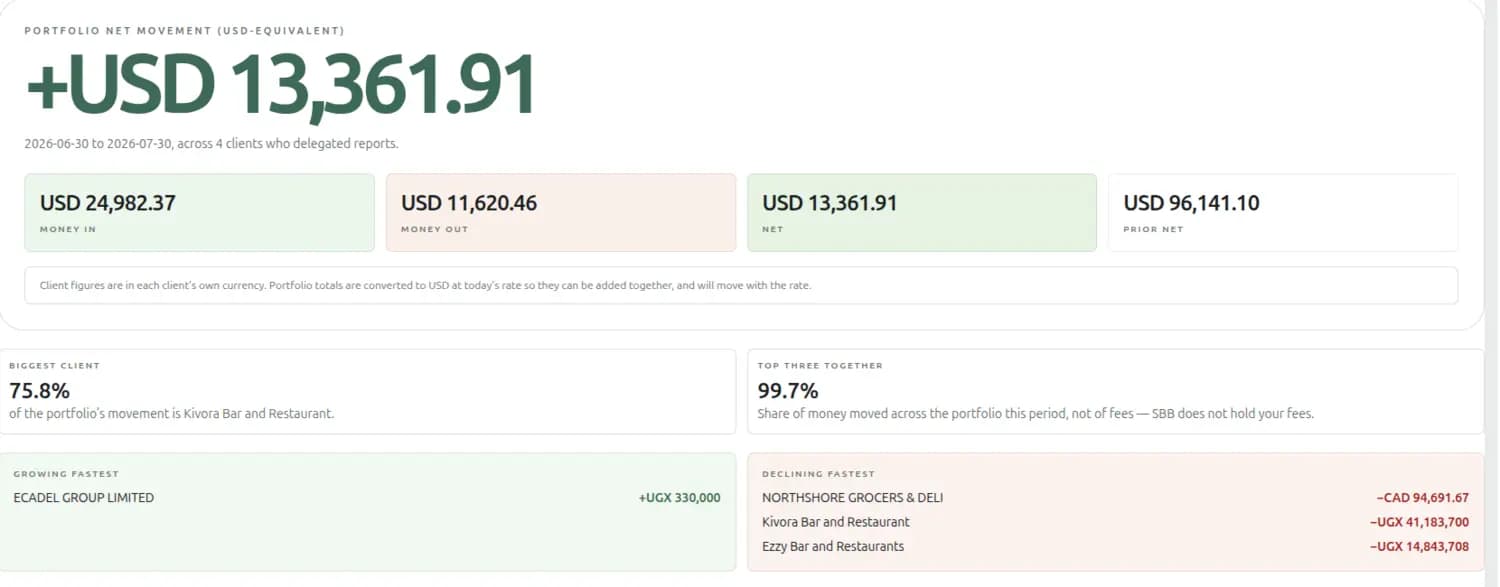
One reporting currency for the firm; each client still kept in its own.
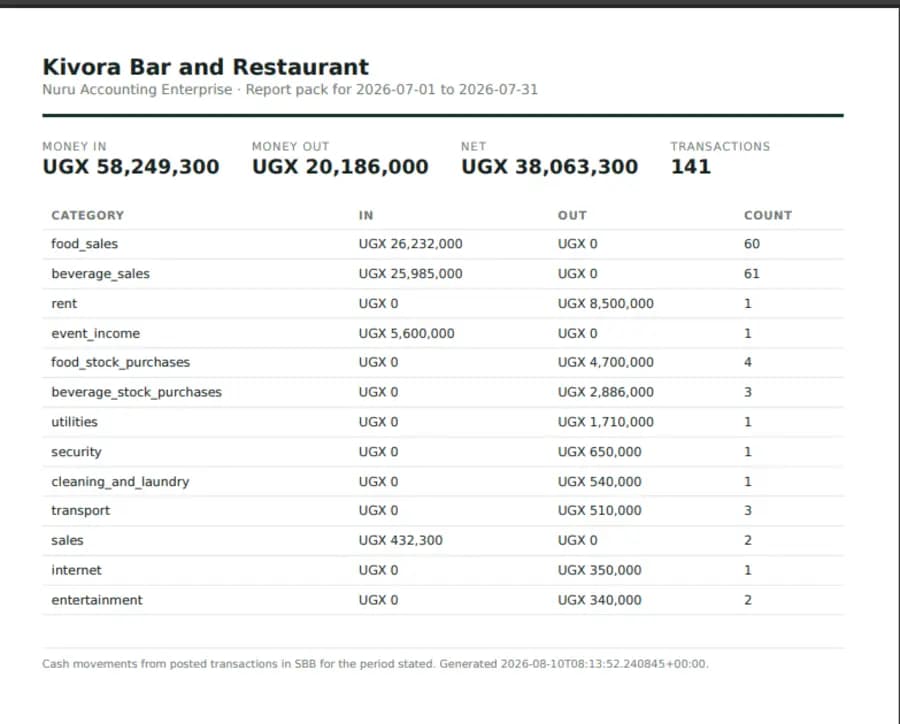
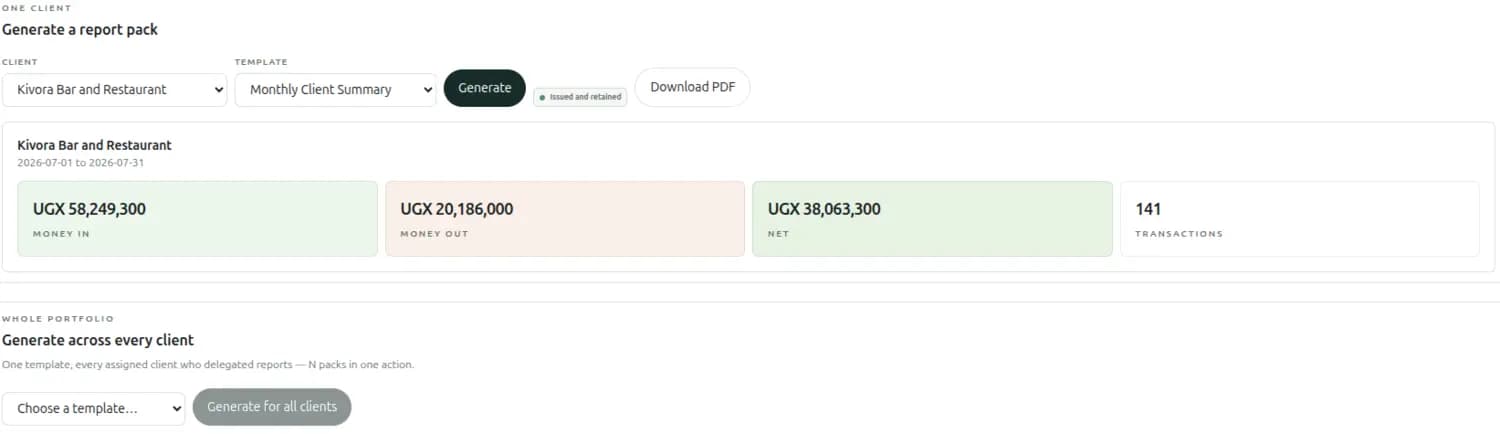
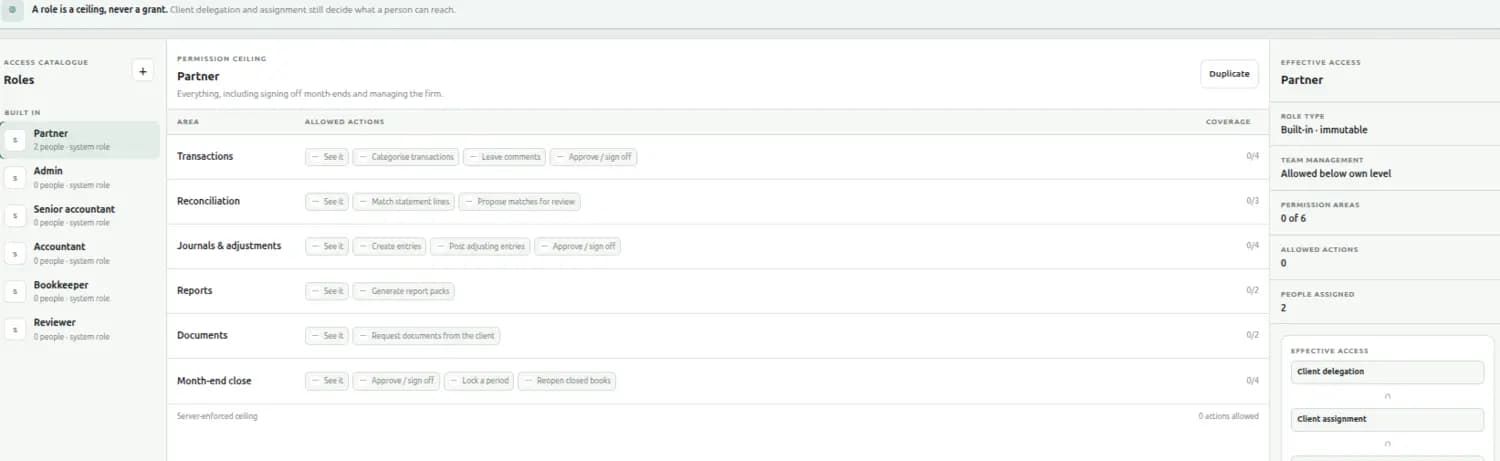
Every screen on this page is the running application. The firm, the clients and the figures belong to a demonstration account — they are not customer data, and nothing here is a usage claim. Names of real people have been frosted out of the screenshots.
Client-controlledEvery permission is approved by the owner, and revocable instantly.
Maker-checkerA person cannot approve their own proposed change.
Books must tieQuickBooks migration is checked against the source trial balance.
Built for local railsMobile money and POS activity arrive as accounting records.
The portfolio
See the work across the firm — then open the client behind it.
One row per client: what they have delegated, in which currency, what the engagement is, anything unusual SBB noticed in their recent activity, and a health score with its trend. Press Enter on a row and you are in their ledger — no login to ask for, no export to wait on.
Clients
“3 unusual patterns in recent activity” is a place to start Monday, not a number to admire.
One monthly rhythm
Turn repeated bookkeeping into an exception workflow.
Your team spends its attention where judgement is needed, and every hand-off is visible to the person on the other end of it.
01
Bring in the month
Drop statements for several clients at once. When a client has more than one account, SBB asks which — it never guesses.
02
Let rules do the repeat work
Preview a firm rule against real rows before saving it, then apply it across matching bank or mobile-money activity.
03
Review the exceptions
Bulk-categorise the routine. A junior's sensitive change becomes a proposal that carries the original value with it.
04
Ask for what is missing
Request a document inside the client's own SBB. They upload, you both can reply in words, and the thread stays beside the work.
05
Close with real sign-offs
Accountant review, senior review, client approval, closed — each step naming who it is waiting on.
06
Deliver the pack
Generate a branded period pack for one client, every client in one action, or a consolidated client group.
Month-end that hands over properly
“Submitted for review” should say who it went to.
A status is not a hand-off. When a period moves to senior review, the people who actually hold sign-off on that client are named and told — and the reviewer opens the figures, the checklist and the note from whoever submitted it.
Who it is waiting on
By name, and why them rather than someone else — only people who actually hold sign-off on that client.
What you are signing
The period's real figures and category breakdown, on the same screen as the button.
What is unfinished
The checklist of pending review, receivables, payables and reconciliation — stated as what you are signing off despite.
How it got here
Who started it, who submitted it, what they said on the hand-off, and when.
And if nobody on that client can sign off, the screen says so — rather than leaving the period waiting for a person who does not exist.
What you told the client
A report pack you can still produce in October.
Packs used to be generated, sent and forgotten. Every pack is now kept exactly as it was issued — because regenerating reads the ledger as it stands today, and one corrected entry makes the “same” pack come back different.
One client, or all of them
Generate across every client in one action
Pick a template and a client and you get the period’s figures on screen before anything is issued. Pick the template alone and every assigned client who delegated reports gets their own pack — N packs, one action, each in that client’s own currency.
Issued, then never editedYour firm’s brandingClient groups
Honest about what it is: cash movements from posted transactions, for the period stated. It is not called a balance sheet, because it is not one.
Re-opening a pack shows the figures the client received, not today’s.
Built for a firm
A role is a ceiling, never a grant.
Six built-in roles, plus any you write yourself. A role can only narrow what a client delegated — it can never widen it — so nobody in your firm can acquire an access the client did not give, however senior they become.
Roles & permissions
Every action, written down, per area
Transactions, reconciliation, journals and adjustments, reports, documents and the month-end close — each with the exact actions that role may take, and the coverage it adds up to. The effective access panel then shows what a person really holds once the client’s delegation is applied on top.
Server-enforced. The screen is showing you the same ceiling the API applies.
People, not seats
Invite a colleague by email. They set their own password and land in your firm — they never create a business of their own to get in.
Rank, enforced
Nobody can act on someone at or above their own level, and nobody can remove the firm's owner. Assignments survive a promotion.
Portfolio close
One board for deadlines your firm set, books that slipped, blockers, senior review and client approval — with the oldest unfinished period leading.
A consistent chart
Build a chart-of-accounts template once, preview the impact on a real client, then apply it when a client needs the firm's standard.
Your identity, not ours
Your display name, logo and accent appear in your workspace, on your clients' screens and on every report pack you send.
Groups that consolidate
Put related clients in a group and report across them, without merging books that must stay separate.
The client who has nothing yet
Set the business up yourself, and hand it over later.
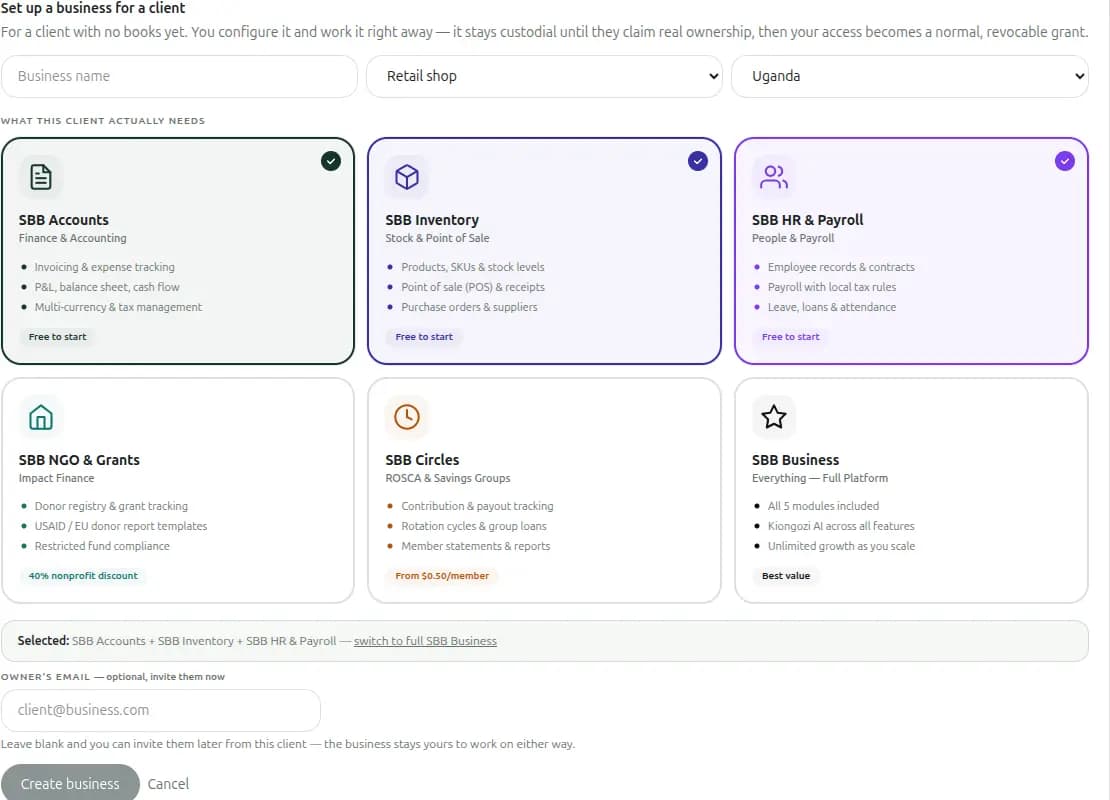
Most practice tools assume the client already has books. For the ones who do not, you create the business, choose only the modules they actually need, and work in it right away. It stays custodial until they claim real ownership — and at that moment your access becomes a normal, revocable grant like everyone else’s.
Custodial businesses
Only the parts that fit the client
A retail shop needs the ledger, stock and a till. A savings group needs contributions and payouts. An NGO needs donor registries and restricted-fund compliance. Pick the modules, leave the rest out, and the client is never charged for or confused by features they do not use.
AccountsInventory & POSHR & payrollNGO & grantsSavings groups
The owner’s email is optional. Leave it blank and the business is still yours to work in.
The trust contract
Win access without asking a client to surrender control.
The guarantee is enforced by the product, not left as a sentence in an engagement letter.
The business owns its data
Your practice receives delegated access, never ownership. Records stay with the client when the engagement ends.
They approve the exact scope
The owner sees the requested modules and actions in plain language, and can narrow or decline them.
Revocation is immediate
An owner can remove access at any moment — never blocked by a notice period, an unpaid balance, or a billing state. There is no shadow copy to retrieve.
Both sides see the record
Grants, changes, sign-offs and revocations are written to an activity trail the client can inspect for their own business.
Requests & the record
Nothing starts without a yes, and nothing happens off the record
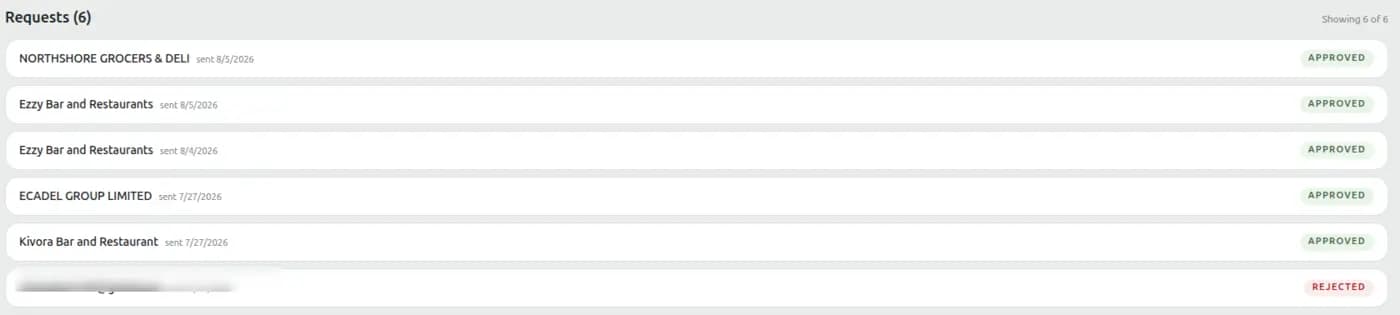
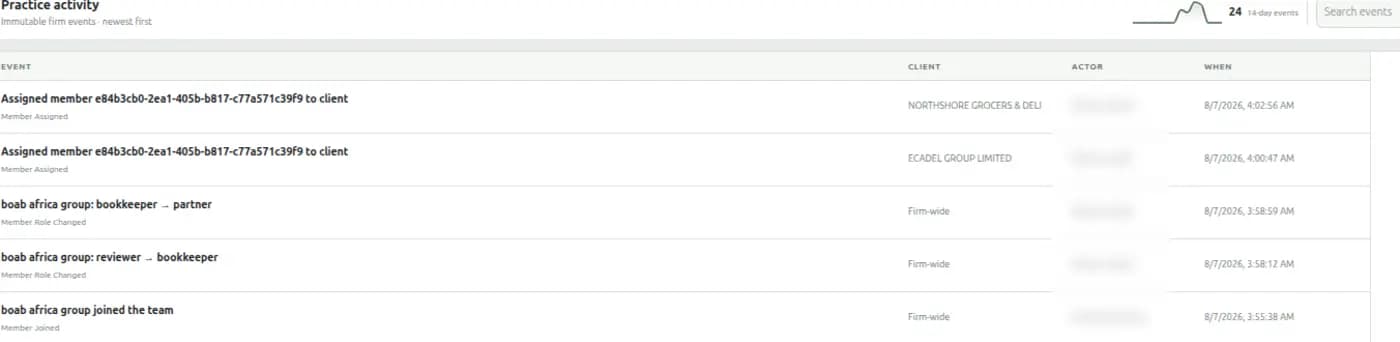
Every request your firm sends is listed with its answer — approved, or refused. Everything your people then do is written to an immutable firm log: who was assigned to which client, who changed whose role, who opened a month-end and who closed it. Your client can inspect the same trail for their own business.
One request was refused, and the refusal is as permanent a record as the approvals.
Move without guessing
A migration is complete when the trial balance ties.
Bring one suitable client first. Review the account mapping, preview the result, compare it with the QuickBooks trial balance, and only then commit the import.
Controlled before it writes
Unknown account types block instead of silently becoming expenses. Mapping stays editable, and parity is checked again when the migration executes.
Reversible while you verify
Preview is the dry run. An unverified migration can be rolled back as a unit, and re-running the same source does not double-post it.
The client can send you something nobody asked for.
Most tools let an accountant request a document and stop there. A business holding the new lease or the letter that arrived this morning had no way to hand it over — which is exactly when they most want one.
A filing cabinet they control
Anything a client files starts private. Sharing it with you is one click and always reversible, and you are told how many documents you cannot see — enough to ask for one, never enough to read it.
Read it without downloading it
Images, PDFs, CSVs, text and Markdown open in place. Word and Excel say so plainly and offer the file, rather than showing a blank frame.
Both sides can reply in words
“Actually the March one, not April” belongs beside the request, not in WhatsApp while the request sits looking unanswered.
Requests are answered, not just sent
A file sent in reply appears with the rest of the shared documents, so a client's answer is never hiding in a different list from their other paperwork.
Where SBB is different
Books shaped around how African businesses actually trade.
Mobile money is a ledger rail
MTN, Airtel and M-Pesa activity is parsed, ruled, categorised and reconciled against a telco statement — down the same path as a bank account.
The till posts into the books
For retail and hospitality clients, SBB Till and the ledger are one system. There is no nightly connector to reconcile and no gap to explain.
The accountant app works offline
Trial balance, ledger, P&L, balance sheet, reports and reconciliation stay available on a Windows machine when the connection does not.
Multi-currency is explicit
Clients keep accounts in their real currencies. The firm picks one reporting currency for portfolio totals, and the page says so where it converts.
Clear commercial ownership
Create the practice free. Decide who pays, per client.
The practice workspace needs no business of its own and costs nothing. Every new client business gets the full 90-day trial; after that the client can choose a plan, or your firm can ask to manage it at a rate below list.
When the client pays
Their subscription stays theirs. Your delegated access and your staff workflow never depend on taking over their billing.
When the practice pays
The owner approves the takeover, and anything they already paid for runs out first. You see your wholesale rate and your invoices; the client never does.
Leaving, either way
The paid period is the notice period, so a firm cannot hold a client and a client cannot walk off with a year the firm bought. Waiting is always free.
Invoices that survive
Issued once, never altered, re-downloadable at the rate that applied that day — something to hand your own client and your own auditor.
What you charge your client is between the two of you — we take no cut of your fees and never show your client what you pay us.
Every new business gets 90 days of Pro free, no card required, and there's a free plan after that. You can bring a client on to see whether it fits before anyone commits.
Your first client, deliberately
Set up the practice. Prove one book. Then grow.
Choose one client with mobile-money volume, a till, or unreliable connectivity. Migrate, prove the balances, run one month in parallel, and expand when the firm asks you to. No card to create the workspace, and no client access without the owner approving it.